Counter
Lets build an example counter! This will teach you how to use React state and callbacks.
Assuming you have a slash command, /counter, lets create a handler and make it render our custom React component, Counter:
tsx
client.on(Events.InteractionCreate, (interaction) => {
    if(!interaction.isChatInputCommand()) return;
    if(!interaction.commandName !== "counter") return;

    djsx.create(interaction, <Counter />);
});
Now, lets define Counter as a React function component:
tsx
const Counter = () => {
    return (
        <message v2>
            <text>
                Hi!
            </text>
        </message>
    )
};
But we need to have a button, right? Lets add a button!
tsx
const Counter = () => {
    return (
        <message v2>
            <text>
                Hi!
            </text>

            <row>
                <button>
                    Increment
                </button>
            </row>
        </message>
    )
};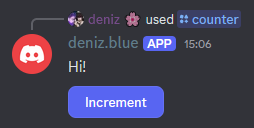
However, when we click the button, nothing happens.
We can add an event handler to our button like so:
tsx
const Counter = () => {
    const clickHandler = () => {
        console.log("Button clicked!");
    };

    return (
        <message v2>
            <text>
                Hi!
            </text>

            <row>
                <button onClick={clickHandler}>
                    Increment
                </button>
            </row>
        </message>
    )
};
Now when you click Increment, it should log the message to the console.
Now, finally, we can add an useState react hook to track the counter state:
tsx
import { useState } from "react";

const Counter = () => {
    const [count, setCount] = useState(1);

    const clickHandler = () => {
        console.log("Button clicked!");
    };

    return (
        <message v2>
            <text>
                Count: {count}
            </text>

            <row>
                <button onClick={clickHandler}>
                    Increment
                </button>
            </row>
        </message>
    )
};
And then, inside our click handler, we can use setCount to actually increment the state:
tsx
const clickHandler = () => {
    setCount(c => c + 1);
};
Now we have an interactive counter!